On a tight budget for a NAS, router or local LLM box, the obvious move is a used 17×17 cm ITX mainboard from Xianyu (the Chinese second-hand market) for a few dozen to ~200 yuan. I scraped 239 listings to find out what these cheap boards can really do.
| Stage | Count |
|---|
| Raw listings | 239 |
| After cleaning | 105 |
| Rejected | 134 |
| CPU identified | 42 |
| PassMark matched | 36 |
Cleaning rules: keep only explicit ITX boards, drop accessories, complete machines, bundles, repair parts and unpriced listings. Then extract the CPU model from the title, match the multi-core score against our benchmark database (6,715 CPUs), and divide by price.
The ranking: J4105 wins by a landslide
| CPU | Score | Price | Score/¥ |
|---|
| Intel Celeron J4105 | 2,805 | ¥126 | 22.26 |
| Intel Celeron J4105 | 2,805 | ¥130 | 21.58 |
| Intel Celeron J4105 | 2,805 | ¥138 | 20.33 |
| Intel Celeron J4105 | 2,805 | ¥140 | 20.04 |
| Intel Celeron J3455 | 2,237 | ¥125 | 17.90 |
| Intel Celeron J3160 | 1,256 | ¥100 | 12.56 |
| Intel Celeron N3160 | 1,184 | ¥100 | 11.84 |
| Intel Celeron J1900 | 1,139 | ¥100 | 11.39 |
Value per yuan
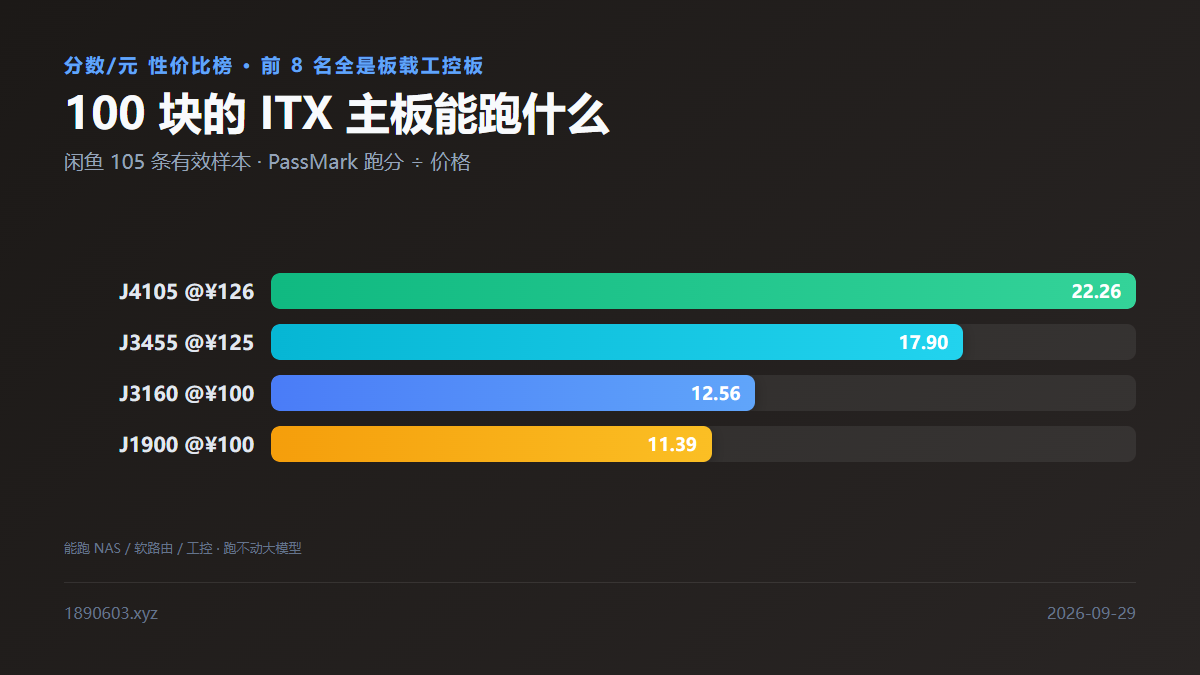
J4105 @¥12622.26
J3455 @¥12517.90
J3160 @¥10012.56
J1900 @¥10011.39
The J4105 leads at 22.26 points/yuan, 24% ahead of second place. But this ranking has a serious caveat.
What the ranking hidesThe top 8 are all soldered-CPU industrial boards — J-series Celerons are bonded to the board, and sellers rarely state the model or score, so you infer it from the title. They're cheap because the CPU is ancient (2018's J4105, 4C/4T, 2,805 points).
What these boards can and can't do
What does 2,805 (CPUMark) mean? Against our database it's roughly desktop i5 from a decade ago. What it can do:
- ✅ NAS / router: 4 cores handle lightweight OSes fine; several J3455 boards with Intel GbE are the usual entry point for fnOS and ES users.
- ✅ Download box / media server / print service: IO-bound work doesn't stress the CPU much.
- ✅ Industrial control: these boards are designed for POS terminals, ad players and elevator controllers, where stability beats speed.
- ❌ Local LLMs: no. The J4105 lacks usable integrated graphics on these 17×17 boards, and a 2,805 CPU score makes a 7B model take all day.
So if your goal is running models locally, skip this ranking. That needs an iGPU and more RAM — see our GPU AI compute lookup and CPU benchmark guide. This ranking is only useful for NAS and industrial work.
If you do buy: five pitfalls
- Check if the CPU is soldered first. Board-mounted Celerons are cheap but inflexible (fewer RAM slots, no PCIe expansion). If you plan to upgrade either, avoid them.
- Check the memory generation. J1900/J3160/J3455 are DDR3, and so are most boards after J4105; H410/H81 socketed boards are DDR4. Confirm your RAM fits — DDR3 and DDR4 are not interchangeable.
- Read the "board only" wording. Top listings exclude RAM and often the heatsink, sometimes the PSU. Add these to your total.
- Ask about PSU and stability on pulled industrial boards. Many are salvaged (labelled 原装拆机) with modified BIOS or aged capacitors. Strong seller ratings and return policies are worth paying for.
- Watch for no-return listings. Half the entries say 不退不换, so a failure is on you. Always transact through the platform's escrow, never private transfers.
Price reference: median by form factor
The median price across 105 valid samples is ¥125, concentrated in the 100–140 range. Listings below median tend to have more complete titles and specifications — the two highest-weighted factors in my scoring (match 13, description 5.3).
Data noteScraped from Xianyu (goofish.com) public search on 2026-09-29: 239 raw → 105 cleaned, 42 CPUs identified, 36 scores matched. Prices are asking prices for used items (shipping may vary); scores come from public PassMark rankings. Condition varies widely — treat this as buying advice, and verify specs and condition yourself before ordering.