核显跑 26B 大模型完整实录:模型清单、参数调优与复现路径

这是一份可以照着还原任何一次测试的档案。我的局域网小主机 235h 上跑过好几个 26B 级模型,踩过的坑基本都在这里了。写下来是因为每次换模型、换后端都要重新查一遍,太浪费。

机器速查

项目值
主机235h — Windows 11 企业版 LTSC 26200
IP192.168.31.61(SSH 免密)
CPUIntel 14 核 14 线程,Max 2.0GHz
GPUIntel Arc 140T 核显(12GB,UMA 共享)
内存23.5 GB
核显共享显存默认 57%(约 13.4GB)→ 调优后 87-90%(约 19.7-21.2 GiB)
第一个坑默认 57% 共享显存装不下 16GB 的 26B 模型,Vulkan / SYCL≥24 / OpenVINO 全部报 OutOfDeviceMemory 或 res=-3。必须调注册表 SystemPartitionCommitLimitPercentage(详见 核显共享显存调优)才有一切。

模型清单:两条路线

路线 A:OpenVINO IR(官方预转换)

属性值
模型gemma-4-26b-a4b-it-int4-ov
类型OpenVINO IR,INT4(NNCF INT4_ASYM gs128,AWQ 精度)
大小20 文件 / 14.3 GB
下载源OpenVINO/gemma-4-26b-a4b-it-int4-ov(hf-mirror)

IR 目录里的文件构成:openvino_language_model.bin 是主体(13.0 GB),openvino_vision_embeddings_model.bin 是视觉编码器(547 MB),还有 tokenizer、detokenizer、text_embeddings 各自的 bin/xml。多模态靠 VLMPipeline 处理,支持图片输入。

踩坑记录:openvino_language_model.xml 正确大小应是 5.1 MB。局域网内曾流传一个被截断成 118 KB 的坏文件,加载直接报 Error parsing element attribute at offset 118773,得从 hf-mirror 重下正确版。

路线 B:GGUF(llama.cpp 通用格式)

模型大小参数量
gemma-4-26B-A4B-it-Q4_K_M.gguf16.02 GB26B.A4B
supergemma4-26b-uncensored-fast-v2-Q4_K_M.gguf16.02 GB25.23B
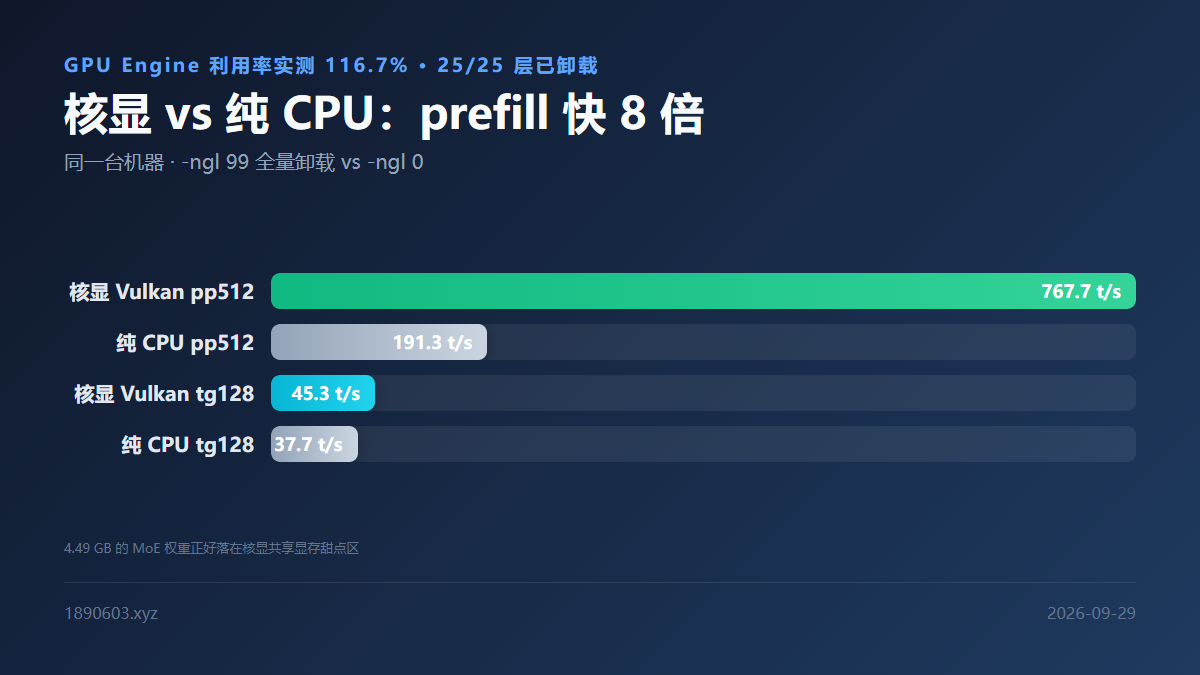
同一台机器上核显全量卸载与纯 CPU 的 prefill 和 decode 速度对比

下载源速查

源说明
hf-mirror(OpenVINO IR)cdn 302 → us.aws.cdn.hf.co,实测 curl -L 约 26 MB/s
ggml-org(GGUF)llama.cpp 官方原版转换

路线 A 实测:OpenVINO GenAI 原生管线

最关键的一条更正(2026-09-04):正确的后端是 ATTENTION_BACKEND=PA,不是 SDPA。SDPA 会导致长上下文 decode 严重衰减——8k 就掉到约 2 t/s;而 PA 全程平坦,约 14-15 t/s 一直撑到 16k。早期"必须用 SDPA 绕过连续批处理断言失败"的结论是错的。

import openvino_genai as ov_genai

MODEL_DIR = r"C:\path\ov-gemma4-26b"

# PA 后端:长上下文 decode 不掉速
# 32k 级长输入再加 KV_CACHE_PRECISION=u4
pipe = ov_genai.VLMPipeline(
    MODEL_DIR, "GPU", **{"ATTENTION_BACKEND": "PA"}
)

res = pipe.generate(
    "请用中文简述量子纠缠是什么,并给出一个应用例子。",
    max_new_tokens=120,
)
print(res.texts[0])

API 调用四个注意点

  • 用命名参数(max_new_tokens=),不要显式传 GenerationConfig 对象。
  • temperature=0.0 不被接受(do_sample 时须大于 0),用默认温度。
  • 输出取 res.texts[0]。
  • 必须用 VLMPipeline,用 LLMPipeline 会报找不到 input_ids(因为输入是 inputs_embeds)。

GenerationConfig 采样默认值

字段默认说明
do_sampleFalse默认 greedy(最快);True 走采样更慢
temperature1.0采样温度
top_k / top_p∞ / 1.0采样开关

四条路线的最优方案

用途最佳路线关键数字
通用推理llama.cpp Vulkan 全量 offloadpp512 243.6 / tg128 21.4 t/s
官方 IR 权重OpenVINO GenAI(PA 后端)pp512 约 500 / decode 14-15 t/s
长上下文常驻llama-server -ub 256 -c 6553620K+ 稳定,prefill 69.3 t/s
16K 基准测试serve_ov.py(OV PA 后端)16k+500 输出约 67s 往返
MoE 的一个重要限制26B.A4B 这种 MoE 模型,llama.cpp 是按层整层分配权重的,不能"激活的专家放 GPU、未激活的放 CPU"。所以虽然只有 4B 激活参数,16 GB 权重还是得整体装进显存——激活参数少不等于显存占用少。

服务化:长上下文参数怎么设

llama-server.exe -m <model>.gguf \
  -ngl 99 -t 8 -fa on \
  -ub 256 -c 65536 \
  --host 0.0.0.0 --port 8080 --cache-reuse 64
  • -c 65536 + -ub 256 在 ≤30k 范围内速度稳定,20k 时 prefill 69.3 t/s。
  • --cache-reuse 64 启用前缀缓存,重复前缀的请求能省掉大部分 prefill。
  • 更大的 -ub 会吃 FA 临时内存,-c 65536 + -ub 512 我遇到过 iGPU 驱动级 OOM。

OpenVINO 后端的架构级 bug

gemma4 架构在 llama.cpp 的 OpenVINO 后端上,只有 stateless 模式能用,长上下文直接崩:E4B 崩在约 pos 1024,12B 崩在 1536/2048,26B 同样受影响。解法是 GGML_OPENVINO_STATEFUL_EXECUTION=0 配合 -fa 1。

所以如果你的模型是 gemma 系,走 OpenVINO 后端要留个心眼;Vulkan 后端虽然 prefill 慢一些,但长上下文稳得多。

复现路径速查

:: 测速(llama-bench)
cd C:\llama\vulkan
llama-bench.exe -m <gguf> -ngl 99 -t 8

:: 切到 OpenVINO 后端
set GGML_OPENVINO_DEVICE=GPU
cd C:\llama\openvino
llama-bench.exe -m <gguf> -ngl 99 -t 8

更细的测试脚本(prefill 扫描、decode 计时、内存监控、OV 性能提示)都归档在同一个目录里,共 40 多个脚本。日常最常用的三个:ov_prefill.py(prefill 扫描)、decode_timer.py(纯 decode 计时)、monitor_mem.py(共享内存占用监控)。

数据说明本文所有数字均为本机实测(235h / Arc 140T / llama.cpp b10621 / OpenVINO GenAI 2026.5 nightly),不同驱动与配置会有浮动。后端横评的详细数据见 llama.cpp 四后端横评,服务端化细节见 llama-server 服务化。

This is a log you can follow to reproduce any of my tests. I've run several 26B-class models on my LAN box 235h, and the pitfalls are all here. I'm writing it down because re-researching them on every model or backend switch is pure waste.

Machine at a glance

ItemValue
Host235h — Windows 11 企业版 LTSC 26200
IP192.168.31.61(SSH 免密)
CPUIntel 14 核 14 线程,Max 2.0GHz
GPUIntel Arc 140T 核显(12GB,UMA 共享)
RAM23.5 GB
iGPU shared VRAM默认 57%(约 13.4GB)→ 调优后 87-90%(约 19.7-21.2 GiB)
First pitfallThe default 57% share can't hold a 16 GB 26B model — Vulkan / SYCL≥24 / OpenVINO all fail with OutOfDeviceMemory or res=-3. You must raise SystemPartitionCommitLimitPercentage first (see iGPU shared VRAM tuning).

Model list: two routes

Route A: OpenVINO IR (official pre-converted)

PropertyValue
模型gemma-4-26b-a4b-it-int4-ov
TypeOpenVINO IR,INT4(NNCF INT4_ASYM gs128,AWQ 精度)
Size20 文件 / 14.3 GB
SourceOpenVINO/gemma-4-26b-a4b-it-int4-ov(hf-mirror)

The IR directory: openvino_language_model.bin is the bulk (13.0 GB), openvino_vision_embeddings_model.bin is the vision encoder (547 MB), plus tokenizer, detokenizer and text embeddings. Multimodal goes through VLMPipeline with image support.

Pitfall log: openvino_language_model.xml should be 5.1 MB. A truncated 118 KB copy floating around the LAN caused Error parsing element attribute at offset 118773 on load — re-download the correct file from hf-mirror.

Route B: GGUF (llama.cpp universal format)

ModelSizeParams
gemma-4-26B-A4B-it-Q4_K_M.gguf16.02 GB26B.A4B
supergemma4-26b-uncensored-fast-v2-Q4_K_M.gguf16.02 GB25.23B
iGPU full offload vs pure CPU on the same machine, comparing prefill and decode speed

Download sources

SourceNote
hf-mirror(OpenVINO IR)cdn 302 → us.aws.cdn.hf.co,实测 curl -L 约 26 MB/s
ggml-org(GGUF)llama.cpp 官方原版转换

Route A results: OpenVINO GenAI native pipeline

The most important correction (2026-09-04): the correct backend is ATTENTION_BACKEND=PA, not SDPA. SDPA makes long-context decode collapse — about 2 t/s by 8k — while PA stays flat at ~14-15 t/s all the way to 16k. The early "you must use SDPA to bypass the continuous-batching assertion" conclusion was wrong.

import openvino_genai as ov_genai

MODEL_DIR = r"C:\path\ov-gemma4-26b"

# PA 后端:长上下文 decode 不掉速
# 32k 级长输入再加 KV_CACHE_PRECISION=u4
pipe = ov_genai.VLMPipeline(
    MODEL_DIR, "GPU", **{"ATTENTION_BACKEND": "PA"}
)

res = pipe.generate(
    "请用中文简述量子纠缠是什么,并给出一个应用例子。",
    max_new_tokens=120,
)
print(res.texts[0])

Four API gotchas

  • Use keyword arguments (max_new_tokens=); don't pass a GenerationConfig object explicitly.
  • temperature=0.0 is rejected (must be > 0 when sampling) — just use the default.
  • Read the output from res.texts[0].
  • You must use VLMPipeline — LLMPipeline fails to find input_ids because the input is inputs_embeds.

GenerationConfig sampling defaults

FieldDefaultNote
do_sampleFalsegreedy, fastest; True samples and is slower
temperature1.0Sampling temperature
top_k / top_p∞ / 1.0Sampling switches

Best config per route

Use caseBest routeKey numbers
General inferencellama.cpp Vulkan 全量 offloadpp512 243.6 / tg128 21.4 t/s
Official IR weightsOpenVINO GenAI(PA 后端)pp512 约 500 / decode 14-15 t/s
Long-context servicellama-server -ub 256 -c 6553620K+ 稳定,prefill 69.3 t/s
16K benchmarksserve_ov.py(OV PA 后端)16k+500 输出约 67s 往返
Important MoE limitationFor MoE models like 26B.A4B, llama.cpp allocates weights per whole layer — it can't put active experts on GPU and inactive ones on CPU. So even with only 4B active parameters, the full 16 GB of weights must fit in VRAM. Few active parameters ≠ low memory use.

Serving: long-context parameters

llama-server.exe -m <model>.gguf \
  -ngl 99 -t 8 -fa on \
  -ub 256 -c 65536 \
  --host 0.0.0.0 --port 8080 --cache-reuse 64
  • -c 65536 with -ub 256 is stable up to 30k; 20k prefill runs at 69.3 t/s.
  • --cache-reuse 64 enables prefix caching so repeated prefixes skip most of the prefill.
  • Larger -ub eats FA scratch memory — -c 65536 with -ub 512 gave me an iGPU driver-level OOM.

An architecture-level OpenVINO bug

The gemma4 architecture on llama.cpp's OpenVINO backend only works stateless and crashes at long context: E4B dies around pos 1024, 12B around 1536/2048, 26B likewise. The workaround is GGML_OPENVINO_STATEFUL_EXECUTION=0 with -fa 1.

If your model is from the gemma family, be careful with the OpenVINO backend — Vulkan is slower on prefill but far more stable at long context.

Reproduction quick reference

:: 测速(llama-bench)
cd C:\llama\vulkan
llama-bench.exe -m <gguf> -ngl 99 -t 8

:: 切到 OpenVINO 后端
set GGML_OPENVINO_DEVICE=GPU
cd C:\llama\openvino
llama-bench.exe -m <gguf> -ngl 99 -t 8

The finer test scripts (prefill sweeps, decode timing, memory monitoring, OV perf hints) are archived in the same directory — 40+ scripts total. The three I use most: ov_prefill.py, decode_timer.py, and monitor_mem.py.

Data noteAll figures are measured on my own box (235h / Arc 140T / llama.cpp b10621 / OpenVINO GenAI 2026.5 nightly) and vary by driver and config. For the full backend comparison see llama.cpp four-backend benchmark, and for serving details see llama-server serving.
返回文章列表