32B 模型各显卡输出速度对比

网上讨论"跑大模型买什么卡",十有八九在吵算力(TFLOPS)。但我实际折腾下来发现一个挺重要的点:本地跑大模型,真正卡脖子的不是算力,是显存和显存带宽。这篇用尽量人话的方式,把这三个数各管什么讲清楚。

看显存:决定能不能跑

推理时,模型的权重必须整个装进显存。Q4 量化后的典型体积:

模型规模Q4 权重什么卡能装
8B约 5G8G 卡就行
14B约 9G12G 卡
32B约 19.5G24G 卡(甜点)
70B约 43G48G / 80G
235B约 130G+多卡集群

显存不够只有一条路:CPU offload,把权重放内存里轮流搬——速度断崖式掉到个位数 token/s,基本没法用。所以选卡第一步:先看你最常跑的模型要多大显存

看带宽:决定生成有多快

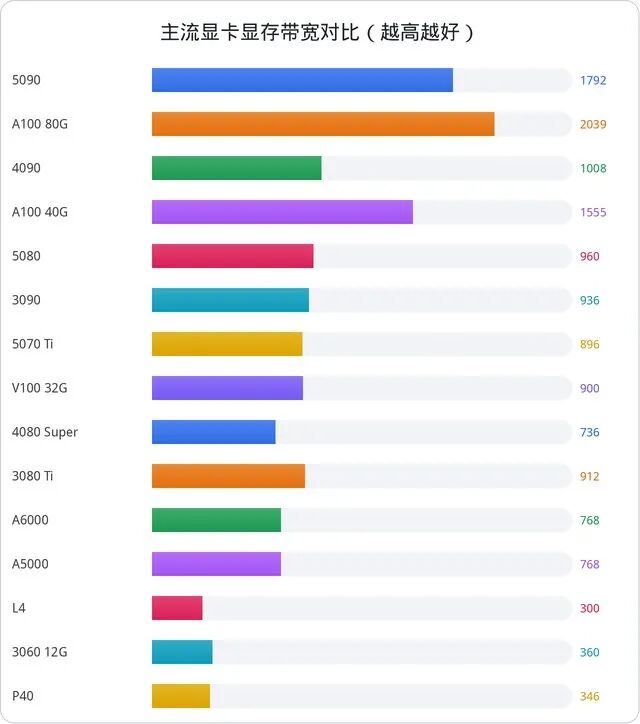
生成阶段(decode)每出一个 token,都要把整个模型的权重从显存搬一遍。搬得多快,生成得多快。这就是为什么显存带宽(GB/s)和 decode 速度几乎成正比。

几个代表选手:

  • RTX 5090:1792 GB/s —— 32B Q4 实测 70 tok/s
  • RTX 4090:1008 GB/s —— 38 tok/s
  • RTX 3090:936 GB/s —— 33 tok/s
  • Tesla V100 32G:900 GB/s —— 33 tok/s(二手三千块,这就是它还能打的原因)
  • Tesla P40:346 GB/s —— 18 tok/s

这也是二手 V100 一直有人买的原因:HBM2 显存带宽 900 GB/s,和 3090 一个档次,价格却便宜一半。带宽大的老卡,跑推理依然能打

看算力:决定首字等多久(尤其 Agent)

每次对话开头,模型要把整段提示词读进去、算出第一个字,这一步叫 prefill(预填充)。它和 decode 完全相反:prefill 吃算力(FP16 张量 TFLOPS),不吃带宽

日常聊天几乎无感:一句"你好"就几个 token,中端卡也是秒回。但编程 Agent 是重灾区:opencode 这类工具的系统提示词加工具定义有一万 token 上下,Claude Code 更是两万上下,而且 Agent 每次调用都要重新读一遍。算力低的卡,prefill 慢,就是反复干等。

拿 32B 模型 + 1 万 token 提示词算首字等待:

显卡prefill (tok/s)首字等待
RTX 50906068约 1.6 秒
RTX 40902270约 4.4 秒
RTX 30901088(实测)约 9.2 秒
Tesla V100 32G1086约 9.2 秒
Tesla P40(无张量核心)68约 2.5 分钟

所以选卡的第二条标准:如果你主要跑 Agent,别只看 decode,算力高(新架构张量核心多)的卡在 prefill 上优势明显。这也是同样的显存我更推荐买新架构而不是堆老卡的原因。

KV 缓存:上下文越长,显存越紧

模型会把读过的上下文存成 KV 缓存,同一会话内下一轮不用重算——这是多轮对话快的原因。但缓存本身吃显存:30B-A3B 开 128K 上下文时,KV 缓存(fp16)约 12.6G。24G 卡跑 32B 不敢开满 128K,不是跑不动,是缓存装不下。

省显存技巧:KV 缓存开 Q8 量化能砍一半;上下文长度按实际需要设,别无脑开满。

一张图记住三兄弟

  • 显存(GB) → 能不能跑:权重装得下吗?
  • 带宽(GB/s) → 生成多快:decode tok/s ≈ 带宽 ÷ 模型体积
  • 算力(TFLOPS) → 首字多快:prefill,Agent 场景的关键

选卡口诀:按最常跑的模型选显存,选带宽大的,跑 Agent 再看算力。具体型号的实测数据,看这篇24 张卡速查,或者直接用 显卡 AI 算力速查工具

免责声明:文中数值为 2026 年 8 月整理的实测或推算参考,随软件版本和上下文长度变化,仅供选型参考。

Discussions about "which GPU for local LLMs" usually turn into TFLOPS arguments. But hands-on experience says otherwise: for local inference, VRAM and memory bandwidth matter more than raw compute. Here's what each number actually controls.

VRAM: whether it runs at all

Weights must fit entirely in VRAM. Typical Q4 sizes: 8B ≈ 5 GB, 14B ≈ 9 GB, 32B ≈ 19.5 GB, 70B ≈ 43 GB. If it doesn't fit, the only option is CPU offload — speed collapses to single-digit tok/s. Step one: pick VRAM for the models you actually run.

Bandwidth: how fast it generates

During decode, every generated token requires streaming the whole model through VRAM. Decode speed is therefore roughly proportional to bandwidth: RTX 5090 (1792 GB/s) → 70 tok/s on 32B; 4090 (1008) → 38; 3090 (936) → 33; V100 32G (900) → 33. That's why used V100s remain popular: HBM2 bandwidth at half the price of a 3090.

Compute: how fast the first token arrives

Prefill reads the whole prompt before the first token appears. It's compute-bound (FP16 tensor TFLOPS), not bandwidth-bound. Chatting is fine — but coding agents re-read 10–20K-token system prompts every call. On a 32B model with a 10K-token prompt: 5090 waits ~1.6 s, 4090 ~4.4 s, 3090/V100 ~9 s, and a tensor-less P40 needs ~2.5 minutes. If you run agents, newer architecture with more tensor cores pays off even at equal VRAM.

KV cache: long context eats VRAM

Context is stored as a KV cache so subsequent turns skip recomputation — but the cache itself occupies VRAM (30B-A3B at 128K needs ~12.6 GB fp16 KV). Q8-quantized KV cache halves that; set context length to what you actually need.

Remember the three brothers

  • VRAM → can it run? (weights must fit)
  • Bandwidth → how fast? (decode ≈ bandwidth ÷ model size)
  • Compute → how fast is the first token? (prefill, key for agents)

Rule of thumb: size VRAM to your models, maximize bandwidth, and check compute if you run agents. Real-world numbers: 24-GPU cheat sheet and the GPU AI lookup tool.

Disclaimer: figures compiled August 2026 from measurements and estimates; they vary with software and context length.
返回文章列表